Home, section by section
What each part of Home is telling you.
Home is read from the top down, and it is deliberately short. Sections appear only when they have something to say, so your Home rarely looks exactly like anyone else's — and on a quiet day it is nearly empty.
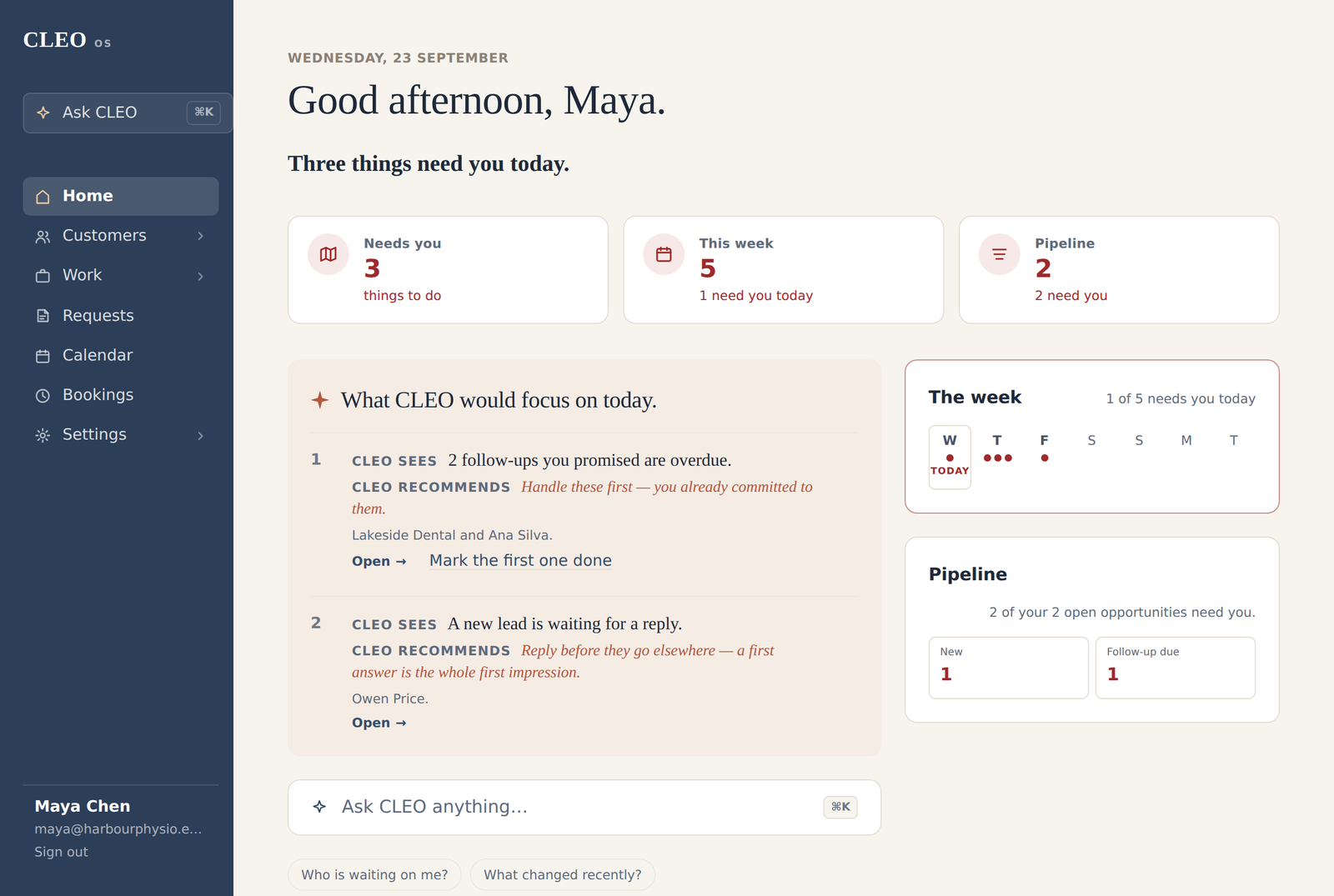
CLEO's read
The page opens with today's date, a greeting, and one sentence in CLEO's own voice: how many things need you today, and whether anything else is worth a look. It counts the same things the list below shows, so the number and the list never disagree.
Today at a glance
Under that sit up to four small cards, each a link to where the fact lives:
| Card | What it counts, and where it goes |
|---|---|
| Needs you | Things you are responsible for right now. Opens the full list. |
| Quick answers | Questions you can settle with one tap. Jumps further down Home. |
| This week | What is dated in the next seven days. Opens the calendar. |
| Pipeline | Open opportunities, and how many need you. Opens Pipeline. |
Quick answers, This week and Pipeline appear only when there is something in them. On a brand-new workspace, the cards are left out entirely.
Today
This is CLEO's priority for the day: at most three things, numbered, because the order carries the meaning. Each one gives you the fact, marked CLEO sees, and what to do about it, marked CLEO recommends, along with a few of the names involved and an Open link.
The heading changes with the day: What CLEO would focus on today.
when there are several, One thing is worth your attention today.
when there is one, Nothing needs you right now.
when there are none.
Anything else CLEO could have raised is counted underneath — "more things can wait — they are below" — and appears in Needs you.
Ask CLEO
A box reading Ask CLEO anything… sits under Today, with the ⌘K shortcut beside it. On a wider screen, two ready-made questions sit beneath it: Who is waiting on me? and What changed recently? On a phone they are left out, because Ask has a permanent place in the bar at the bottom of the screen.
Needs you
The heart of the page: everything you are responsible for, in one list, whether it came from a customer, a request, work or the calendar. Each entry gives the name, why it is there, its timing, how long it has been waiting, and a link straight to it.
- Home shows the first five, with the true total beside the heading. When there are more, a link says how many more need you and opens the full list.
- When there is nothing:
Nothing is waiting on you right now.
While you were away
If someone came to your business through your website since you last signed in — an enquiry, or an appointment booked online — Home adds a short section naming them, what they wanted, and whether it is Booked, Needs you, or nothing was recorded. When the visitor may be someone you already have, the line adds may be Priya Nair — unconfirmed. Each line links to that person's record.
It covers only the time since you were last here, and it is left out entirely when nothing came in.
Quick answers
Up to three short questions with one-tap answers. When there are more, a link below them says how many more there are to answer. Quick answers explains each kind.
Bring in what is live
During your first couple of weeks, Home may offer to bring in what is already happening: appointments already booked, customers you expect to talk to this month, work under way. You can add them, or say there is nothing — either way, CLEO asks once and moves on. It never asks for history.
The side column
- The week — the next seven days as marks. A filled mark means something that day needs a person; an open ring is simply happening. The note above says whether anything needs you today. Each day opens the calendar.
- Pipeline — your open opportunities by stage, each a link into that stage.
- Waiting on others — a count and one sentence, with the list folded away. It ends
Nothing needed from you.
That is the point of the section: knowing what you are not carrying. - CLEO noticed — everything CLEO noticed, as a single counted line, followed by
Not tasks — they clear on their own when the records change.
The detail is one click away.
When Home looks different
- A new workspace offers Set up CLEO with a Begin button.
- Setup part-finished shows Finish setting up CLEO with a Continue button.
- Setup finished or set aside, with nothing recorded yet, shows Getting started instead of the glance cards: add your first lead, add a client, and — if setup was set aside — confirm your business details.
- A quiet day shows the calm sentence in place of Today, and "Nothing is waiting on you right now" under Needs you. That is CLEO agreeing with you, not a page that failed to load.